Got a Regent parking charge notice? Check it for defects
Regent Parking tickets must meet specific signage, timing, and wording requirements. Upload yours and Parking Mate AI checks for issues that could get it cancelled.
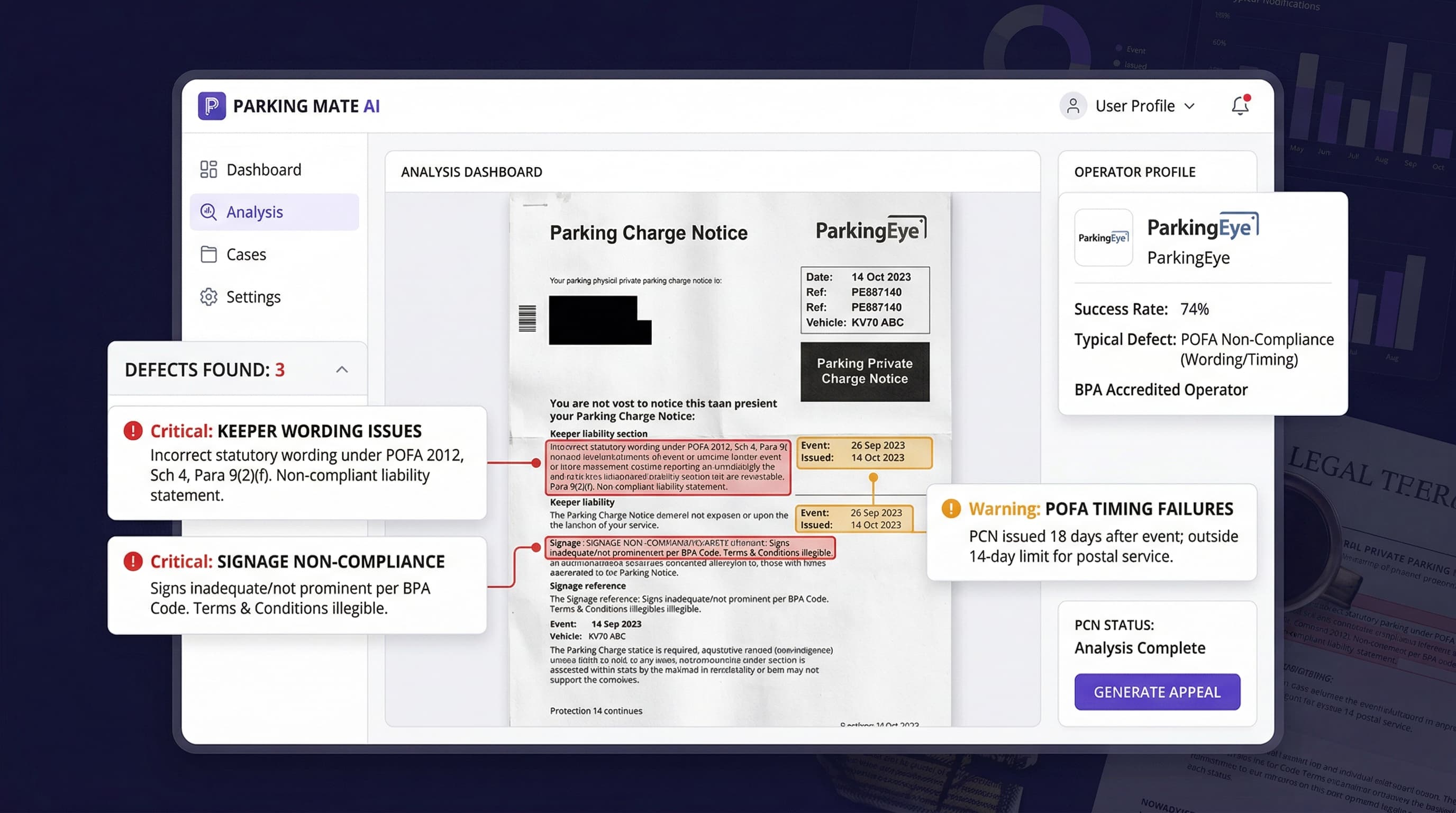
Received a Regent parking charge notice? Check it for defects in signage, timing, wording, and procedure before you pay.
What a Regent parking charge notice means for you
Receiving a Regent parking charge notice can be stressful, but it does not automatically mean you should pay. Many Regent Parking tickets contain defects in signage, wording, timing, or procedure. These defects can form the basis of a successful challenge.
The rules that Regent Parking must follow are detailed and specific. Regent Parking is a IPC member and must comply with the IPC code of practice and the Protection of Freedoms Act 2012.
Upload your notice and let Parking Mate AI check it against the requirements that apply to your exact situation. If defects are found, you will receive a professional letter ready to send.
What Parking Mate AI checks on your Regent parking charge notice
Signage and notice wording
The signs at the Regent Parking car park and the wording on your notice must meet specific IPC code standards. Missing or unclear signs are one of the most common defects.
POFA 14-day timing
Regent Parking must serve a notice to keeper within 14 days. A late notice can mean the registered keeper is not liable for the charge.
Procedure and process errors
Regent Parking must follow a set process when pursuing a charge. Skipped steps or incorrect procedures weaken their position.
Evidence and documentation gaps
Regent Parking must hold and present proper evidence. Missing ANPR images, logs, or records can undermine the charge.
Evidence and information to keep together
A photo or copy of the Regent parking charge notice
Any earlier notices, reminders, or letters from Regent Parking
Photographs of the car park signage if available
A note of the key dates
Any correspondence with Regent Parking or IAS
Related pages
Regent Parking Charge Notice Appeal
Appeal a Regent parking charge notice appeal with Parking Mate AI.
Regent Parking Reminder Notice
Challenge a Regent Parking reminder notice with Parking Mate AI.
Regent Parking Debt Recovery Letter
Challenge a Regent Parking debt recovery letter with Parking Mate AI.
Regent Parking Letter Before Claim
Respond to a Regent Parking letter before claim with Parking Mate AI.
Regent Parking County Court Claim Defence
Defend a Regent Parking county court claim defence with Parking Mate AI.
Regent Parking County Court Judgment
Challenge a Regent Parking county court judgment with Parking Mate AI.
Regent Parking Help
Return to the main Regent Parking help page for an overview of all available support.
Regent Parking Charge Notice FAQs
Common questions about parking ticket appeals and how Parking Mate AI works.
What is a Regent parking charge notice and why have I received one?
A Regent parking charge notice is a demand for payment issued by Regent Parking for an alleged parking contravention. You have received one because Regent Parking's enforcement system has flagged your vehicle. It does not automatically mean you must pay. Many Regent Parking tickets contain defects worth checking.
How long do I have to check a Regent parking charge notice?
You typically have 28 days to appeal a Regent parking charge notice directly to the operator. If rejected, you can then escalate to IAS. The earlier you check for defects, the more options you have.
Can I check a Regent parking charge notice myself?
Yes. You have the right to check a Regent parking charge notice. A properly structured challenge citing specific defects is far more effective than a generic complaint. Parking Mate AI helps you identify those defects.
What defects does Parking Mate AI check on a Regent parking charge notice?
Parking Mate AI checks your Regent parking charge notice for signage adequacy, POFA 14-day notice to keeper compliance, and charge amounts against the IPC code of practice cap. It also checks for required information on the notice and whether Regent Parking followed the correct procedure. The specific checks depend on the notice stage.
Should I pay a Regent parking charge notice straight away?
Not until you have checked whether the Regent parking charge notice is valid. Many Regent Parking tickets contain defects in signage, timing, wording, or procedure. Checking before you pay costs nothing and may save you the full charge.
What evidence should I keep for a Regent parking charge notice?
Keep the Regent parking charge notice itself, all earlier notices and letters, and any photographs of the car park signage. Also save screenshots of correspondence with Regent Parking and a written note of key dates. The more evidence you preserve early on, the stronger your position if the case escalates.
What is the POFA 14-day rule and how does it affect my Regent parking charge notice?
Under the Protection of Freedoms Act 2012, Regent Parking must serve a notice to keeper within 14 days of the parking event or of obtaining keeper details from the DVLA. If Regent Parking missed this deadline, the parking charge notice may only be enforceable against the driver, not the registered keeper. This is one of the most common defects and one of the most effective grounds for challenge.
What happens if I ignore a Regent parking charge notice?
Ignoring a Regent parking charge notice usually leads to escalation. Regent Parking will typically send reminders, pass the debt to a collection agency, and may eventually file a county court claim. Responding early keeps more options open.
Does Regent Parking handle parking charge notice cases differently from other operators?
Each operator has its own patterns of enforcement and common defects. Regent Parking is a IPC member, and commonly operates at private car parks and commercial sites. Parking Mate AI applies Regent Parking-specific checks so the defect report is tailored to how Regent Parking operates.
How does Parking Mate AI help with a Regent parking charge notice?
Upload a photo of your Regent parking charge notice and Parking Mate AI reads the details automatically. It checks against IPC code requirements, POFA timing rules, signage standards, and procedural obligations specific to Regent Parking. If defects are found, you can get a professional appeal letter targeting the specific issues on your Regent Parking notice.
Need help with a Regent parking charge notice?
Upload your notice for a free Parking Mate AI defect check. Most results are ready in minutes, and if grounds are found you can get a professional appeal letter straight away.
